The Unicorn Is a Pattern, Not a Model: Why Context Matters
The Unicorn pattern (a breaker block with an overlapping fair value gap) shows up all day, on every timeframe and in both directions. That's why Unicorn pattern trading on its own gives such mixed results. The pattern tells you how to get in. Context tells you whether you should: the higher-timeframe direction, the time of day, which liquidity was taken, and how much room there is to the target.
This article explains each of those filters, shows the same pattern with and without context, and ends with a short check to run before any entry.
What the Unicorn pattern is
A Unicorn forms when price sweeps a high or low, reverses through a breaker block, and leaves a fair value gap that overlaps the breaker. The entry is the retest of that overlap. For the full breakdown of each piece, read Unicorn vs Breaker Block: What's the Difference?.
The Unicorn is, at its core, an entry pattern. That framing matters: it was never meant to be the whole trading plan.
Pattern vs model: what's missing
A pattern is a shape on the chart. It's mechanical: once you know what a breaker and a fair value gap look like, you can find them on almost any chart. That's exactly the problem. If you can find one in both directions every day, the shape alone can't tell you which one to take.
A model is a set of conditions that decides when the pattern is worth trading. It answers the questions the pattern can't:
- Which direction am I trading today?
- Is this the right time of day?
- What liquidity was taken before the setup, and what is price likely to go after next?
- Is there enough room for the trade to reach its target?
The same Unicorn can run to target on one chart and take your stop on another. The difference usually isn't the pattern. It's the context around it.
Here are four context filters. The first three are part of the Unicorn Model's rules. The last one is a final check worth running on any setup before you commit.
Context filter 1: higher-timeframe direction
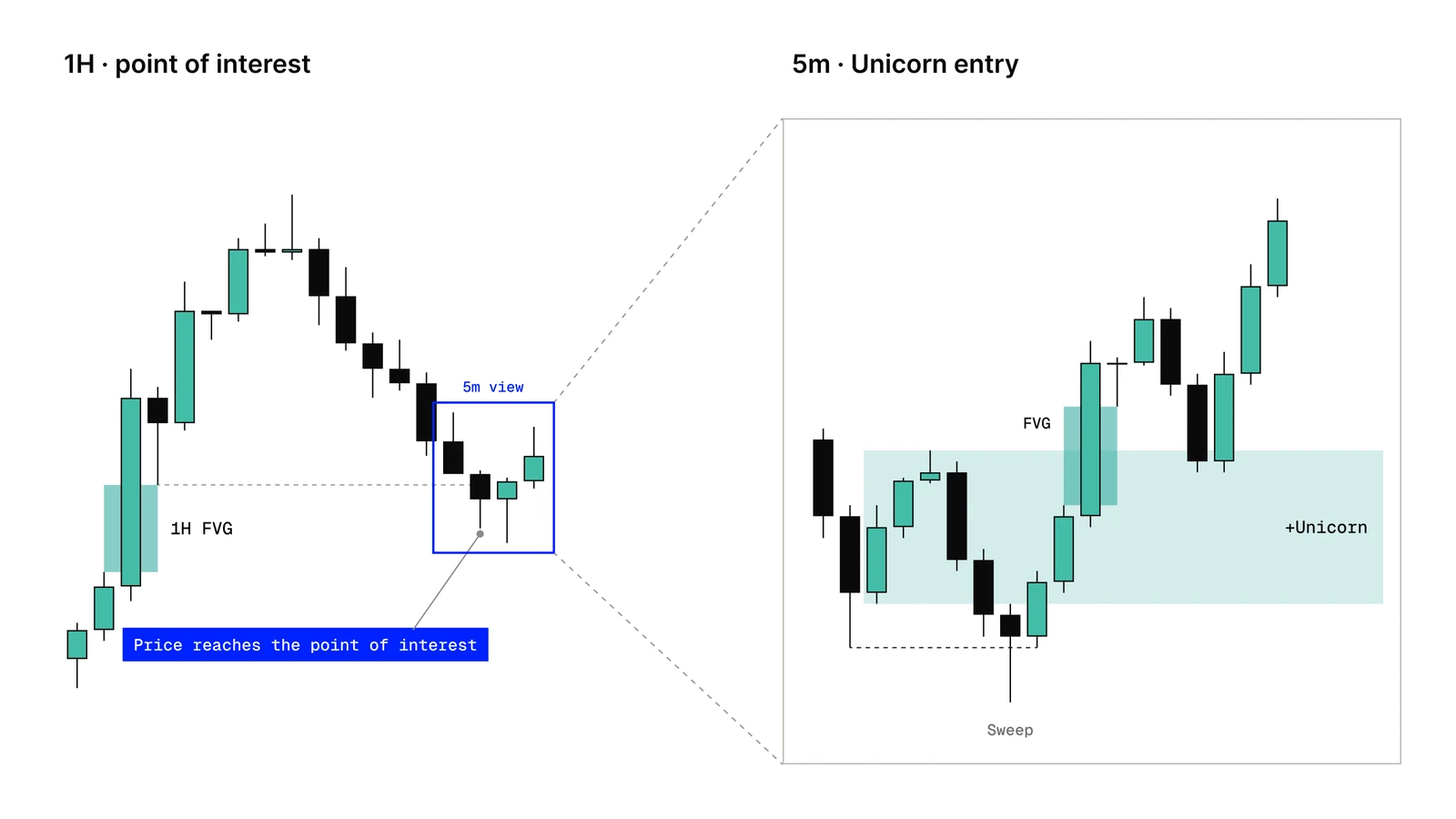
A Unicorn that forms in the middle of nowhere is usually weaker. A Unicorn that forms after price reaches an important higher-timeframe area has a stronger reason to exist. The higher timeframe gives you the location. The lower timeframe gives you the entry.
The areas worth watching are:
- Higher-timeframe fair value gaps. Price returns to an imbalance left on, say, the 1-hour or 4-hour chart.
- Higher-timeframe swing highs and lows. These hold liquidity, and a sweep of one is a reason for price to turn.
When price reaches one of these areas, you don't enter on the touch. You drop to a lower timeframe and wait for a Unicorn in the direction that area suggests. Which lower timeframe to watch depends on the higher-timeframe level that was reached.
When the higher-timeframe point of interest and the lower-timeframe Unicorn point the same way, both timeframes are telling the same story. Those are the setups worth your attention.
Context filter 2: time of day
Unicorns can form at any minute of the day, but not all of them carry the same weight. The breakers that matter most tend to form inside specific windows, when new orders enter the market:
- Session opens. The model focuses on the London, New York AM and New York PM sessions. The Asia session usually ranges, so it's used more to build liquidity than to trade it.
- Scheduled news. On days with high-impact releases, we only look for entries after the release, never before. Before the number prints, price tends to move erratically.
A common sign of a good setup is liquidity being taken in, around or right after a session open: price runs a level that traders positioned around before the open, then reverses. A Unicorn outside these windows isn't automatically wrong, but its odds are much less clear.
Context filter 3: which liquidity was taken
Every Unicorn starts with a sweep, but not every sweep means the same thing. Before you look at the breaker, ask which significant level (session, previous day or higher-timeframe swing) has just been cleared. That sweep, not the tiny one inside the pattern, sets the direction.
- If sell-side liquidity (below a previous low) was taken, the model expects price to go after the buy-side above. Look only for bullish Unicorns.
- If buy-side liquidity (above a previous high) was taken, the model expects price to go after the sell-side below. Look only for bearish Unicorns.
The level matters too. A sweep of the previous day's high or a 1-hour swing low carries more weight than a sweep of a tiny 1-minute high. And a sweep that only wicks through a level and closes back inside is different from price breaking and holding beyond it. That difference is covered in Liquidity Sweep vs Liquidity Run.
Extra check: room to the target
The Unicorn Model uses a fixed 2R take profit by default: the target is twice the distance from entry to stop. Before you enter, check that price has a clear path to that level.
If an obvious opposing level sits between your entry and 2R, such as an untouched higher-timeframe high above a long or a fresh fair value gap in the way, the trade has to fight through it. In that case it's often better to wait. A clear draw on liquidity in your direction, like equal highs or "smooth edges" (clean highs that haven't been run yet) above a long, adds a reason for price to travel.
Position size comes from the stop distance, not from how confident the setup looks.
How to size the trade and why the model uses 2R are covered in Unicorn Risk Management: Position Size and the 2R Target.
Same pattern, two outcomes
Below are two annotated Unicorns that look almost identical on the 5-minute chart. The difference is everything around them.
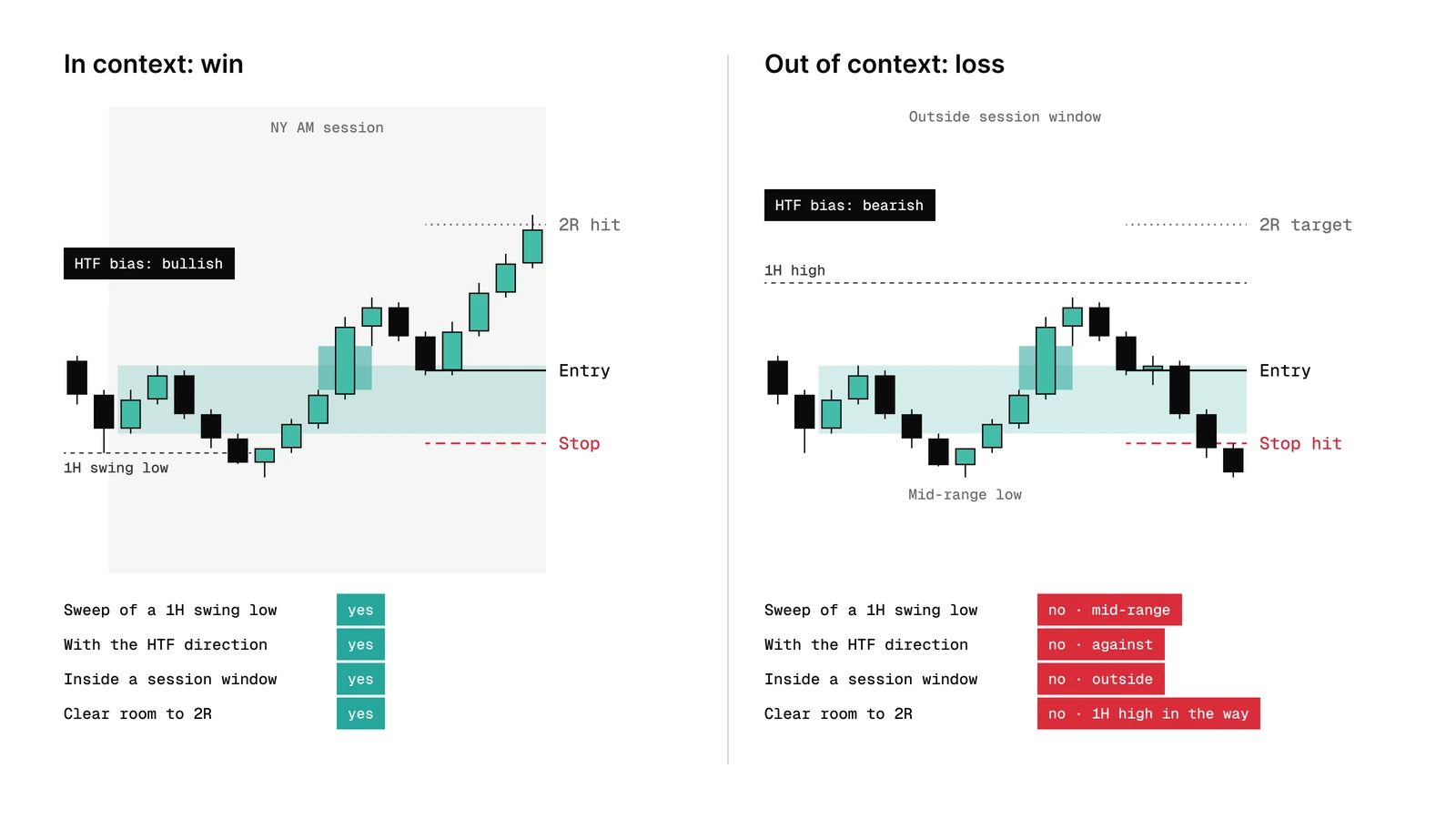
Context doesn't make a trade a winner. The trade on the left could have lost too, and some trades with every filter in place still do. What context changes is which trades you choose to take in the first place, so you stop taking the ones that had little reason to work.
A quick pre-entry check
Before any Unicorn entry, answer these four questions. If you can't answer one of them clearly, wait.
- Direction: which side was swept, and does the higher timeframe agree?
- Time: is this inside a session window, and after any high-impact news?
- Pattern: do the breaker and fair value gap actually overlap, and has a candle closed to confirm it?
- Room: is there a clear path to 2R?
This is the short version.
Once the context checks out, execution is mechanical. Our guide on how to set your Unicorn entry and stop loss covers the confirmation close, the limit order on the retest and the two ways to place the stop.
FAQ
Why do I keep losing with the Unicorn pattern?
Most often because the pattern is taken without context: against the higher-timeframe direction, outside the main session windows, or with no room to the target. The shape can be perfect and still have no reason to work. Filtering by context reduces the number of trades. It doesn't guarantee that the remaining ones win.
What time is best to trade the Unicorn Model?
The model focuses on the London, New York AM and New York PM sessions, especially when liquidity is taken around a session open. Asia usually ranges. On high-impact news days, look for entries only after the release.
Can I trade the Unicorn pattern on its own?
You can, and the pattern itself is mechanical. But it appears in both directions every day, so on its own it can't tell you which setups to take. The full Unicorn Model course adds the context that decides that.
How do I know the higher-timeframe bias?
Look at which side of the market was swept on the higher timeframe, and whether price is reacting from a higher-timeframe fair value gap or swing high/low. If the lows were taken, favor longs. If the highs were taken, favor shorts. Then drop to the lower timeframe for the entry.
Trade the pattern inside a model
This article is published by The Unicorn Model, which sells a TradingView indicator for this setup.
The indicator marks liquidity, breakers, fair value gaps and Unicorns on your chart, so you spend your attention on context instead of redrawing structure. It isn't a signal service: the decision is still yours. See the indicator plans, or start with the full Unicorn Model course.
Trading futures and other leveraged products involves substantial risk of loss and is not suitable for every investor. This article is for educational purposes only and is not financial advice. Past performance does not guarantee future results.